
How to Use a DeWalt Stapler: Quick Guide
If you’ve just picked up a DeWalt stapler—whether it’s the Heavy-Duty Staple and Brad Nailer, the 5-in-1 Multi-Tacker, or a standard staple gun—you’re holding a versatile tool built for speed, power, and reliability. But to get the best results, you need to load it correctly, use the right fasteners, and operate it with proper technique. Using the wrong staples or skipping safety steps can lead to jams, misfires, or even damage to your workpiece.
This guide walks you through every step of using your DeWalt stapler with confidence. You’ll learn how to load staples and brads, choose the right fastener for your material, fire accurately, avoid common mistakes, and keep your tool in top shape. Whether you’re installing insulation, building cabinets, or tackling trim work, this guide ensures you’re using your DeWalt stapler the right way every time.
Load Staples Correctly

Proper loading is the foundation of smooth operation. A misloaded stapler leads to jams, misfires, and wasted time on the job. The process varies slightly by model, but the core rule is the same: orientation matters. Always double-check that your fasteners are inserted in the correct direction before firing.
Load the DeWalt Heavy-Duty Staple and Brad Nailer
This dual-function tool handles both staples and 15 mm brads. Loading is simple, but precision is key to avoiding frustrating jams mid-project.
Insert Staples Point-First
To load staples into this model, start by pressing the rear release button to unlock the magazine. Slide the tray out completely, then insert staples with the pointy end facing forward toward the nose of the tool. Slide the tray back in until it clicks into place, confirming full engagement.
Critical warning: Loading staples backward is the number one cause of jams. Always double-check the direction before closing the magazine.
Load Brads Head-First
When switching to brads, insert them head-first, aligning with the arrow indicators on the tool. Slide the black tray down to secure the nails in place. Confirm you hear the click, as partial seating causes feeding issues during operation.
Load the DeWalt 5-in-1 Multi-Tacker
This model supports multiple fastener types, so selector settings are essential for proper function. Taking time to configure these correctly prevents misfires and extends the life of your fasteners.
Open with Back Clip and Load Staples
Press the spring-loaded back clip to open the chamber. Insert staples straight into the chamber, as some rattling is normal during this process. Slide the chamber closed until you hear a click, then set the front selector lever to the appropriate position. The lower position works for standard staples or brads, while the higher position is for heavy-duty staples.
Pro tip: A side label on the 5-in-1 Multi-Tacker lists all approved staples. Check it before loading to avoid compatibility issues that could damage your tool.
Load Brads in the Left Groove
Flip the tool upside down to access the loading area. Align brads with the left-side groove, which is specifically designed for nail orientation. Close the slider, which should snap shut due to the spring mechanism. Set the selector to the lower position for softwood applications.
Mistake to avoid: Using the wrong groove causes misalignment and jams. Always use the left groove for brads in this model.
Load General DeWalt Staple Guns
Most DeWalt staple gun models follow a universal reload process. Press the release button on the handle’s back to disengage the staple bar. Insert staples with the pointed end facing forward. Slide the track up and re-engage until it clicks, confirming the mechanism is locked.
Verification step: If resistance feels off during insertion, check for bent staples or backward loading before proceeding.
Choose the Right Fastener
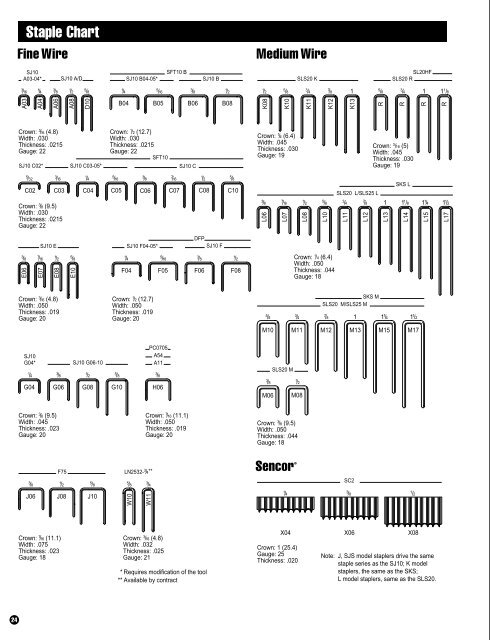
Using the correct staple or brad ensures strong, clean fastening for your specific material. Matching the fastener to your workpiece prevents poor penetration, surface damage, or weak joints that could fail later.
Use T50 Staples for Hardwood
T50 staples feature serrated or pointed edges that improve penetration into dense materials. In hard ash or oak, T50 staples sink flush while Type G staples often leave visible gaps due to limited penetration. For hardwood framing or sheathing, T50 is the recommended choice.
Use Type G for Soft Materials
Type G staples feature flat-ended tips and work best with insulation, softwood, and underlayment. They come in gauge ranges from 6 to 14 mil, making them suitable for general use in less demanding substrates.
Use 15 mm Brads for Trim and MDF
Brad nails for DeWalt staplers are 15 mm in length only. Using longer brads risks jamming the tool or damaging your workpiece. These 18-gauge brads work excellently for securing quarter-inch to three-quarter-inch MDF joints without breakthrough. For soft pine trim, brad heads may sit slightly proud, so use a nail punch to achieve a flush finish.
Warning: Never exceed 15 mm when using brads. Longer nails can pass completely through your material or cause serious jams.
Operate with Proper Technique
Even the best tool fails without correct use. Your stance, pressure, and trigger control directly determine staple depth and joint strength. Taking a moment to position correctly saves rework later.
Apply Firm Pressure at Entry Point
Place the base plate flat on the work surface. Press directly over the staple entry point with firm, even pressure before pulling the trigger. This prevents the tool from bouncing, which causes incomplete staple seating. Without this pressure, staples may sit proud or fail to secure the material properly.
Keep the Tool Perpendicular
Angle driving weakens joints and increases jam risk. Maintain a 90-degree angle to the surface for consistent results. Tilting the tool causes staples to drive at an angle, compromising holding power and potentially damaging the material.
Use Steady Trigger Control
Jerking the trigger disrupts feeding and causes inconsistent staple depth. Pull the trigger with a smooth, even motion to ensure reliable firing and consistent depth control across your entire project.
Monitor Fastener Supply
Running out of staples mid-job breaks your workflow and forces time-consuming reloads. DeWalt’s smart design includes features to help you stay ahead of your fastener supply.
Check the Viewing Window
The transparent viewing window is located on the side of the magazine on both the Heavy-Duty Nailer and the 5-in-1 Multi-Tacker. This allows you to see remaining staples or brads in real time without interrupting your work.
Watch for Red Low-Staple Indicator
Red marks appear in the viewing window when supply is low. This notifies you to reload before the chamber empties completely. Reload as soon as red appears to prevent dry-fires and maintain your work rhythm.
Best practice: Don’t wait until the chamber is empty. Reloading early keeps your workflow smooth and prevents frustrating interruptions.
Switch Fasteners Quickly
The 5-in-1 Multi-Tacker excels at fast transitions between fastener types, making it ideal for jobs that require switching between light and heavy-duty fastening.
Unload Staples with Back Clip
Press the back clip again to open the chamber. Any remaining fasteners fall out easily, allowing quick transitions between staple types. Clear any debris before reloading to maintain smooth operation.
Clear Jams Fast
If a misfeed occurs, open the chamber and remove any bent or stuck fasteners. Re-load with correct orientation, ensuring staples point forward and brads align with the appropriate groove. Keep a small pick or brush handy to clear debris from the feed path during jobs.
Set the Selector Lever Correctly
The 5-in-1 Multi-Tacker uses a front lever to adjust for staple weight and material thickness. Correct selector positioning ensures proper feeding and prevents jams.
Lower Position: Standard Staples and Brads
The lower selector position works for thin materials, light trim, or MDF. This setting uses less spring tension, making it ideal for standard staples and brads in softer materials.
Higher Position: Heavy-Duty Staples
The higher selector position increases spring pressure for reliable feeding of heavy-duty staples. Use this setting when fastening thick wood, sheathing, or insulation materials that require more driving force.
Note: Spring tension adjusts automatically as staples deplete. Less resistance when the chamber is near empty is normal behavior, not a malfunction.
Follow Safety Protocols
A powerful tool demands respect. Safety isn’t optional. It’s essential for protecting yourself and those around you during operation.
Engage the Safety Lock
The flip-style safety lever is located near the trigger. It locks the trigger when engaged, preventing accidental discharge during transport or storage. Always engage the safety when setting the tool down, even for a brief pause.
Keep Fingers Clear
Never place fingers near the moving track or nose of the tool. Loading and unloading should be done with the tool pointed away from you and your body. This simple habit prevents serious injury.
Use Contact-Trip Discipline
Most DeWalt staplers require base plate contact plus trigger pull to fire. Avoid bumping the trigger without surface contact, as this reduces misfires and wastes fasteners. Maintain proper contact-trip discipline for reliable, safe operation.
Maintain Your Stapler
A clean, well-maintained tool lasts longer and jams less. Regular care reduces repair costs and extends the life of your investment.
Clean the Feed Path Regularly
Use a dry brush or compressed air to remove dust, resin, or debris from the feed path. Clean after every 10 hours of use or after completing major projects. This prevents buildup that causes jams and misfeeds.
Inspect Key Components
Check the trigger mechanism for smooth operation with no sticking. Verify the release button fully disengages and re-engages with an audible click. Inspect the base plate for dents that could affect contact and firing consistency.
Store Properly
Remove all staples before storage to prevent spring fatigue. Keep the tool in a dry place to prevent corrosion. Engage the safety lock and use a protective case if available.
Fact: Proper maintenance reduces jams by up to 70 percent according to user-reported data.
Troubleshoot Common Issues

Even with proper care, problems can occur. Here’s how to fix them fast without unnecessary frustration.
Staple Won’t Seat Flush
Cause: Insufficient downward pressure during firing. Fix: Press harder at the entry point while pulling the trigger. Maintain firm, consistent pressure throughout the firing cycle.
Misfeed or Jam
Cause: Backward staples or misaligned brads in the magazine. Fix: Unload completely and re-load with correct orientation. Point-first for staples, head-first in the left groove for brads.
Partial Firing
Cause: Track not fully locked into place. Fix: Re-seat the magazine and confirm you hear the click before continuing. A partially engaged track dislodges during use.
Inconsistent Depth
Cause: Angled application or inconsistent pressure. Fix: Keep the tool perpendicular to the surface and apply even pressure at each staple location.
Tool Fails in Hardwood
Cause: Using Type G staples instead of T50 in dense materials. Fix: Switch to T50 staples, which feature serrated tips for better penetration in hardwoods.
Brad Breaks Through Material
Cause: Using brads longer than 15 mm. Fix: Use only 15 mm brads. They are designed to stop before exiting the material.
Optimize for Your Project
Matching your tool and fastener to the job delivers the best results. Different applications require different configurations for optimal performance.
For Insulation and Sheathing
Use the Heavy-Duty Staple and Brad Nailer with 14 mil Type G or T50 staples. T50 is preferred for plywood or OSB underlayment due to superior holding power.
For Trim and Cabinetry
Use the 5-in-1 Multi-Tacker or dual-function model with 15 mm brads. Use a nail punch to recess heads for a professional finish on visible surfaces.
For Hardwood Framing
Use T50 staples at 14 mil gauge. Avoid Type G staples, which offer limited penetration and result in weak holds in dense hardwood materials.
Maximize Portability and Balance
DeWalt staplers are built for real-world use in various work environments. Use these features to work more efficiently throughout your day.
Use the Built-In Belt Clip
Attach the built-in belt clip to your tool belt for on-the-move access. This reduces strain during overhead or extended work and keeps your stapler within reach without setting it down repeatedly.
Rely on One-Handed Design
The balanced weight reduces fatigue during extended use. The compact size fits in tight spaces, making it perfect for framing, attic work, or cabinet installation.
Know Your Model’s Limits
Dual-function tools offer versatility, but they aren’t perfect for every application. Understanding their limitations prevents disappointment and damaged workpieces.
Not a Replacement for a Dedicated Brad Nailer
Fine finish work like crown molding demands precision that multi-tools cannot consistently deliver. A dedicated 18-gauge brad nailer offers better control and a cleaner finish for high-end trim work. Use DeWalt multi-tools for DIY projects, repairs, and light construction rather than professional finish carpentry.
Key Takeaways for Using Your DeWalt Stapler
With the right technique and maintenance, your DeWalt stapler will deliver fast, reliable performance for years. Always check fastener orientation before loading. Point-first for staples and head-first for brads ensures smooth operation. Reload before the chamber empties by watching the red indicator in the viewing window. Use T50 staples in hardwood applications where Type G staples would fail. Engage the safety lock every time you set the tool down, and clean the feed path after each major project. Following these simple steps keeps your DeWalt stapler working properly and ready for your next project.
Frequently Asked Questions About Using a DeWalt Stapler
How do I load brads into my DeWalt 5-in-1 Multi-Tacker?
Flip the tool upside down and align brads with the left-side groove. Close the slider until it snaps shut, then set the selector to the lower position for softwood. This orientation prevents jams and ensures proper feeding.
Can I use any staples in my DeWalt stapler?
No. DeWalt staplers accept specific staple types including Type G and T50. Using incompatible staples causes jams and may damage the tool. Always check the side label for approved fastener types before loading.
Why do my staples not seat flush in hardwood?
Type G staples have flat ends that don’t penetrate dense hardwoods effectively. Switch to T50 staples, which feature serrated or pointed tips that drive flush in hard ash, oak, and other dense materials.
How do I prevent my DeWalt stapler from jamming?
Load staples point-first with the sharp end facing forward. Keep the feed path clean and free of debris. Check the viewing window regularly and reload before the chamber empties completely to avoid dry-fires.
What length brads can I use in my DeWalt stapler?
Use only 15 mm brads. Longer brads risk jamming the tool or passing completely through your material. The 15 mm length is specifically designed to stop before exiting the workpiece.
When should I engage the safety lock on my DeWalt stapler?
Engage the safety lock every time you set the tool down, even briefly. This prevents accidental discharge during transport, storage, or when taking breaks. It becomes automatic with practice and significantly reduces injury risk.